# Adding sample attributes

Attributes describe samples. Examples of sample attributes include treatment group, age, sex, and time point. Attributes can be added individually in the Metadata tab or in bulk [using a text file](/partek-flow/quick-start-guide.md#the-metadata-tab). In this tutorial, we will add one attribute, 5-AZA Dose, manually.

* Click the **Metadata** tab
* Click **Manage** under Sample attributes (Figure 1)

<figure><img src="/files/bZQKt4ET73dAAdHRZHHN" alt=""><figcaption><p><em>Figure 1. Adding sample attributes manually</em></p></figcaption></figure>

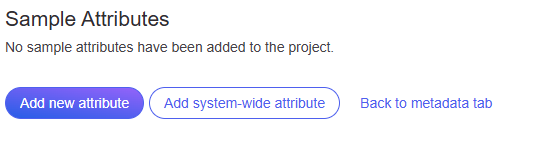
* Click **Add new attribute** (Figure 2)

<figure><img src="/files/CW5KP8xICNa3EmvIBQ19" alt=""><figcaption><p><em>Figure 2. Adding a new attribute</em></p></figcaption></figure>

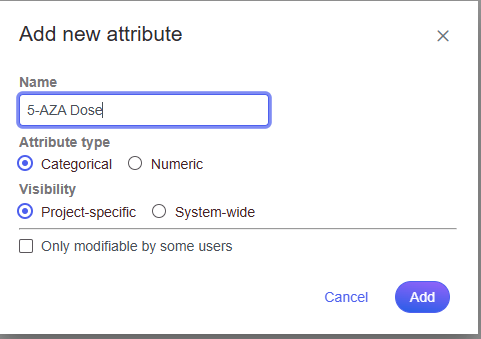
* To configure a new attribute, at Name, type in **5-AZA Dose** as the name of the attribute
* Click **Add** to add 5-AZA Dose as a categorical, project-specific attribute (Figure 3)

<figure><img src="/files/ELt404Ty4RJOFbtXTd4E" alt=""><figcaption><p><em>Figure 3. Configuring a new attribute</em></p></figcaption></figure>

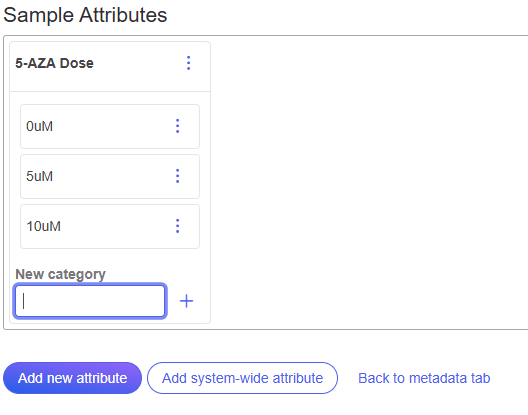
* Name the first New category **0uM**
* Click the plus icon to add category (Figure 4)
* Repeat for two additional categories, **5uM** and **10uM** (Figure 5)

<figure><img src="/files/00QAvYSQlmKaABMyo7mm" alt=""><figcaption><p><em>Figure 4. Creating attribute category</em></p></figcaption></figure>

<figure><img src="/files/nFbo5525f60ev82sC2a1" alt=""><figcaption><p><em>Figure 5. All category attributes for 5-AZA Dose</em></p></figcaption></figure>

* Click **Back to metadata tab**

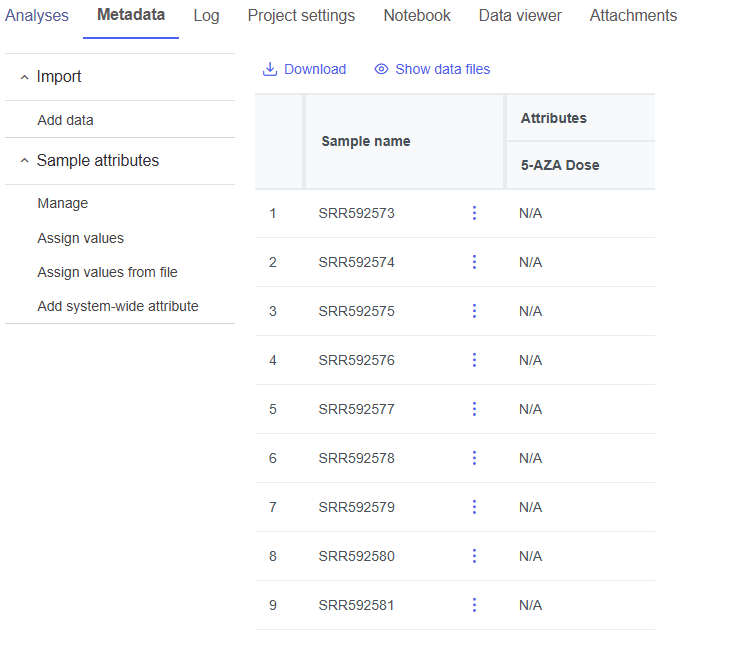
The data table now includes an Attribute column for 5-AZA Dose (Figure 6). Next, we need to assign samples attribute categories for 5-AZA Dose.

<figure><img src="/files/YEmeAvu4PqsbOUDDEhNb" alt=""><figcaption><p><em>Figure 6. Data table updated with column for 5-AZA Dose</em></p></figcaption></figure>

* Select Assign values

The option to edit the 5-AZA Dose field for each sample will appear as a drop-down menu (Figure 7).

<figure><img src="/files/PdgTZNDdHhq8DXFnQ49y" alt=""><figcaption><p><em>Figure 7. Dropdown menu to select treatment for each sample</em></p></figcaption></figure>

* Select the 5-AZA Dose text box for a sample to bring up a drop-down menu with the 5-AZA Dose attribute categories (0uM, 5uM, 10uM)
* Use the drop-down menus to add a treatment group for each sample

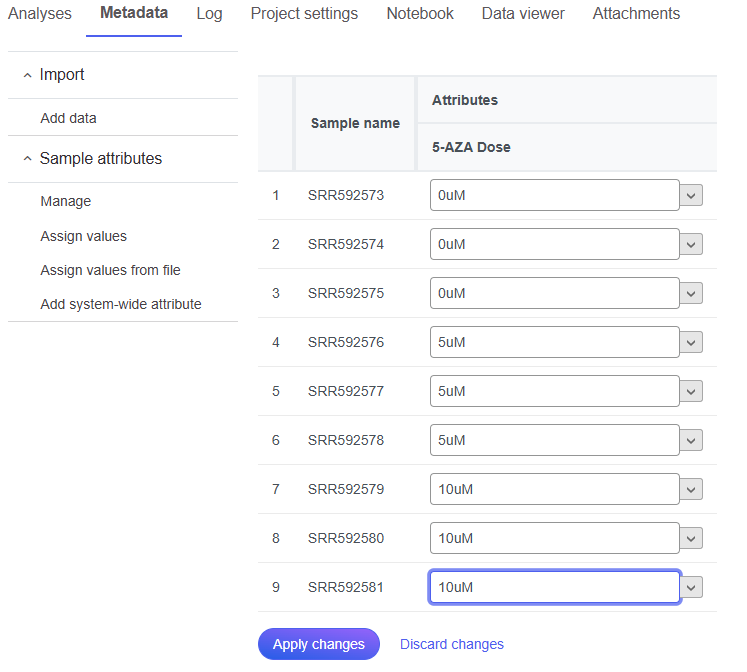
The first three samples (SRR592573-5) should be **0uM**, the next three samples (SRR592576-8) should be **5uM**, and the final three samples (SRR592579-81) should be 10uM (Figure 8).

* Click **Apply changes**

<figure><img src="/files/ApxMD9DNRkoptvjIT8JO" alt=""><figcaption><p><em>Figure 8. Add 5-AZA dose to each sample as shown</em></p></figcaption></figure>

The data table will now show each a 5-AZA Dose attribute for each sample.

## Additional Assistance

If you need additional assistance, please visit [our support page](http://www.partek.com/support) to submit a help ticket or find phone numbers for regional support.


---

# Agent Instructions: Querying This Documentation

If you need additional information that is not directly available in this page, you can query the documentation dynamically by asking a question.

Perform an HTTP GET request on the current page URL with the `ask` query parameter:

```
GET https://help.partek.illumina.com/partek-flow/tutorials/bulk-rna-seq/adding-sample-attributes.md?ask=<question>
```

The question should be specific, self-contained, and written in natural language.
The response will contain a direct answer to the question and relevant excerpts and sources from the documentation.

Use this mechanism when the answer is not explicitly present in the current page, you need clarification or additional context, or you want to retrieve related documentation sections.