# Merge matrices

In complex projects, different data matrices (e.g. observations on rows and features on columns) need to be merged in order to achieve the analysis goals. For example, two cell populations were identified on separate branches of the analysis pipeline and to combine them before any joint downstream steps, the expression matrices have to be combined. Alternatively, two assays (gene expression and protein expression) were performed on the same cells so the expression matrices have to be merged for joint analysis.

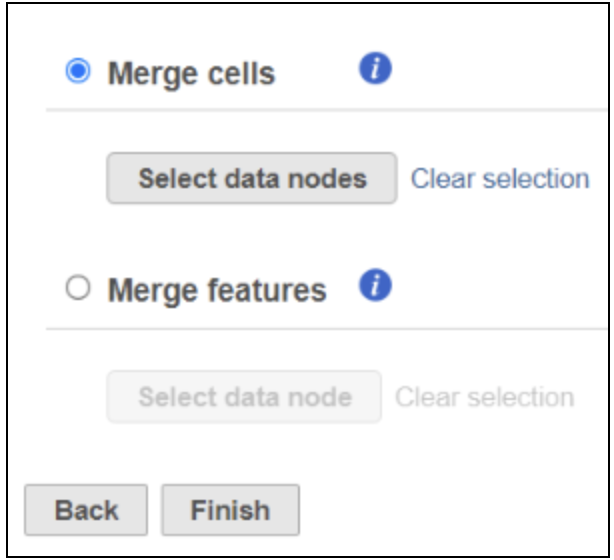
*Merge matrices* task is located in the *Pre-analysis tools* section of the toolbox and it can handle two scenarios: *Merge cells/samples* and *Merge features* (Figure 1). To start, select the first **data node** on the pipeline (e.g. single cell counts) and then select the **Merge matrices** task.

<figure><img src="https://1384254481-files.gitbook.io/~/files/v0/b/gitbook-x-prod.appspot.com/o/spaces%2FJVEESmJAPppJ3ijFq5aR%2Fuploads%2Fgit-blob-50b258ae71d252e41eb2b63903f50680752f5fbb%2Fmergematrices-fig1.png?alt=media" alt="" width="461"><figcaption><p>Figure 1. Setup page for Merge matrices task</p></figcaption></figure>

## Merge Cells/Samples

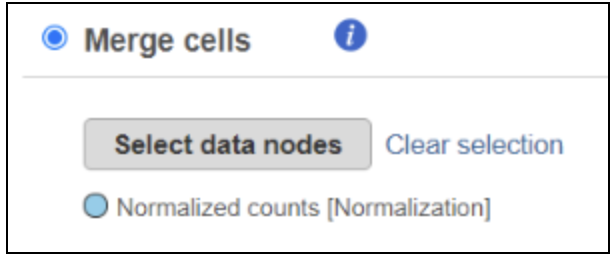
To use the *Merge cells* option, the data matrices (one or more) that are to be merged with the currently selected one should have the same features (e.g. genes), but distinct cells. Push the **Select data nodes** button and Partek Flow will display a preview of the pipeline; the data nodes that can be merged are shown in color of the branch, other data nodes are disabled (greyed out). Left click on the data node that you want to merge with the current one and push the **Select** button, you can select multiple data nodes to merge. The selected node(s) will be shown under the *Select data nodes* button (Figure 2). If you made a mistake, use the *Clear selection* icon. Push **Finish** to proceed.

<div align="center" data-full-width="false"><figure><img src="https://1384254481-files.gitbook.io/~/files/v0/b/gitbook-x-prod.appspot.com/o/spaces%2FJVEESmJAPppJ3ijFq5aR%2Fuploads%2Fgit-blob-ec5786a30647ec0b4dbcc3c04cc5324a3cba0632%2Fmergematrices-fig2.png?alt=media" alt="" width="461"><figcaption><p>Figure 2. Using Merge cells option. The selected data node is shown under the Select data nodes button (in this example: Normalized counts). More than one node can be selected for merging</p></figcaption></figure></div>

## Merge Features

To use the *Merge features* option, the data matrices (one or more) that are to be merged with the currently selected one should have the same cells (or samples), but distinct features (e.g. gene and protein expression). Push the **Select data nodes** button and Partek Flow will display you a preview of the pipeline; the data nodes that can be merged are shown in color of the branch, others are disabled (greyed out). Left lick on the data node that you want to merge with the current one and push the **Select** button. The selected node will be shown under the *Select data nodes* button. Repeat the procedure if you would like to merge additional nodes. If you made a mistake, use the *Clear selection* icon. Push **Finish** to proceed.

## Task Output

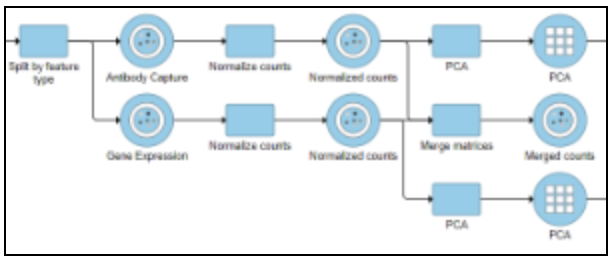
The output of the *Merge matrices* task is a *Merged counts* data node (Figure 3).

<figure><img src="https://1384254481-files.gitbook.io/~/files/v0/b/gitbook-x-prod.appspot.com/o/spaces%2FJVEESmJAPppJ3ijFq5aR%2Fuploads%2Fgit-blob-882accd1a0324d7610e83d275743aa4c06ee0da1%2Fmergematrices-fig3.png?alt=media" alt=""><figcaption><p>Figure 3. Example of a Merged counts data node. The node was created by using the Merge features option of the Merge matrices task. In this example, results of two assays (gene and protein expression) were merged</p></figcaption></figure>

For a practical example using *Merge matrices*, please see our tutorial on [Analyzing CITE-Seq Data](https://help.partek.illumina.com/partek-flow/tutorials/analyzing-cite-seq-data).

## Alternative paths

Depending on your goal, you may want to consider a different approach. For example, data matrices based on two different assays (e.g. gene and protein expression) can be combined using [Find multimodal neighbors](https://help.partek.illumina.com/partek-flow/user-manual/task-menu/exploratory-analysis/find-multimodal-neighbors). Instead of merging two (or more) cell populations by using *Merge cells*, you may want to use filtering (*Filtering* > *Filter groups*) to filter out the populations that you do not consider relevant / filter in the populations of your interest.

## Additional Assistance

If you need additional assistance, please visit [our support page](http://www.partek.com/support) to submit a help ticket or find phone numbers for regional support.