> For the complete documentation index, see [llms.txt](https://help.partek.illumina.com/llms.txt). Markdown versions of documentation pages are available by appending `.md` to page URLs; this page is available as [Markdown](https://help.partek.illumina.com/partek-flow/user-manual/task-menu/quantification/count-feature-barcodes.md).
# Count feature barcodes
* [What is Count feature barcodes?](#what-is-count-feature-barcodes)
* [Running Count feature barcodes](#running-count-feature-barcodes)
* [How does Count feature barcodes work?](#how-does-count-feature-barcodes-work)
## What is Count feature barcodes?
*Count feature barcodes* is a tool for quantifying the number of feature barcodes per cell from CITE-Seq, cell hashing, or other feature barcoding assays to measure protein expression. The input for *Count feature barcodes* is FASTQ files.
## Running Count feature barcodes
*Count feature barcodes* will run on any unaligned reads data node.
* Click the data node containing your unaligned reads containing feature barcodes
* Click the **Quantification** section in the toolbox
* Click **Count feature barcodes**
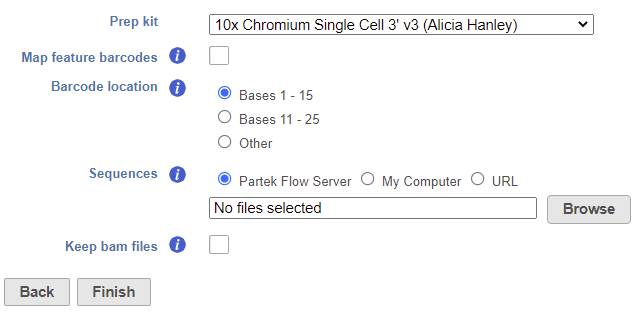
The task set up page allows you to configure the settings for your assay (Figure 1).
* Choose the *Prep kit* from the drop-down menu
For more details on adding *Prep kits*, please see our documentation on [Trim tags](/partek-flow/user-manual/task-menu/pre-alignment-tools/trim-tags.md). The prep kit should include cell barcode and unique molecular identifiers (UMIs) locations.
* Check *Map feature barcodes* box (optional)
This is only necessary for processing data from 10X Genomics' Feature Barcoding assay (v3+ chemistry), which utilizes BioLegend TotalSeq-B. For all other assays, leave this box unchecked.
* Choose the *Barcode location*
For BioLegend TotalSeq-A, choose **bases 1-15**. For BioLegend TotalSeq-B/C, choose **bases 11-25**. For other locations, select **Custom** and specify the start and stop positions.
* Choose a *Sequences* text file
This tab-delimited text file should have the feature ID in the first column and the nucleotide sequence in the second column. Do not include column headers. See Figure 2 for an example.

* Check *Keep bam files* box (optional)
This option will retain the alignment BAM files instead of automatically deleting them when the task is complete. An extra *Aligned reads* output data node will be produced on the task graph. This option is unchecked by default to save on disk space.
* Click **Finish** to run
The output of *Count feature barcodes* is a *Single cell counts* data node.
## How does Count feature barcodes work?
*Count feature barcodes* uses a series of tasks available independently in Partek Flow to process the input FASTQ files. The output files generated by these tasks are not retained in the *Count feature barcodes* output, with the exception of BAM files if *Keep bam files* is checked.
[Trim tags](/partek-flow/user-manual/task-menu/pre-alignment-tools/trim-tags.md) identifies the UMI and cell barcode sequences. The *Prep kit* is specified using the *Prep kit* setting.
[Trim bases](/partek-flow/user-manual/task-menu/pre-alignment-tools/trim-bases.md) trims the insert read to include only the feature barcode sequence. *Trim bases* is set to **Both ends** for *Trim based on* with the start and stop set by the *Barcode location* preference and the *Min read length* set to **1**.
[Bowtie](/partek-flow/user-manual/task-menu/aligners.md) is used to align the reads to the sequences specified in the *Sequences* text file. *Bowtie* is set to **Ignore quality limit** for the *Alignment mode*. Other settings are default.
[Deduplicate UMIs](/partek-flow/user-manual/task-menu/post-alignment-tools/deduplicate-umis.md) consolidates duplicate reads based on UMIs. *Deduplicate UMIs* is set to **Retain only one alignment per UMI**.
[Filter barcodes](/partek-flow/user-manual/task-menu/filtering/filter-barcodes.md) filters the cell barcodes to include cells and not empty droplets. *Filter barcodes* is set to **Automatic**.
Quantify barcodes counts the number of UMIs per cell for each feature in the *Sequences* file. *Quantify barcodes* uses default settings.
To perform these steps individually instead of using the *Count feature barcodes* task, you will need to generate a FASTA and GTF file containing the feature barcode IDs and sequences instead of a text file and build an index file for the Bowtie aligner.
For more information about library file management, please see [Library File Management](/partek-flow/user-manual/settings/components/library-file-management.md).
## Additional Assistance
If you need additional assistance, please visit [our support page](http://www.partek.com/support) to submit a help ticket or find phone numbers for regional support.
---
# Agent Instructions
This documentation is published with GitBook. GitBook is the documentation platform designed so that both humans and AI agents can read, navigate, and reason over technical content effectively. Learn more at gitbook.com.
## Querying This Documentation
If you need additional information that is not directly available in this page, you can query the documentation dynamically by asking a question.
Perform an HTTP GET request on the current page URL with the `ask` query parameter, and the optional `goal` query parameter:
```
GET https://help.partek.illumina.com/partek-flow/user-manual/task-menu/quantification/count-feature-barcodes.md?ask=&goal=
```
`ask` is the immediate question: it should be specific, self-contained, and written in natural language.
`goal` is optional and describes the broader end goal you are ultimately trying to accomplish on behalf of the user. GitBook uses it to tailor the answer towards what is most useful for that goal.
The response will contain a direct answer to the question and relevant excerpts and sources from the documentation.
Use this mechanism when the answer is not explicitly present in the current page, you need clarification or additional context, or you want to retrieve related documentation sections.